Home / Products / Coldwire
Coldwire
Open source Rails gem

When your Hotwire wires go cold.

Coldwire is offline caching for Rails. Your pages keep working without a network.

Noreaster Group wrote the gem. We also take on the work: adding Coldwire to your app for offline mobile access, or shipping a Hotwire Native app on top of the Rails product you already have.

MIT licensed ยท Free & open source ยท Web, PWA & Hotwire Native

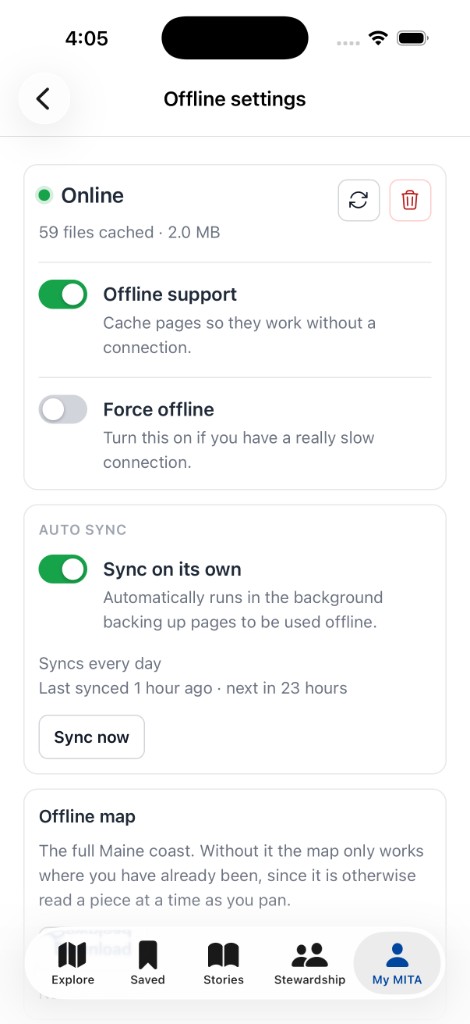
The Coldwire offline settings page: online status, files cached, offline support and force-offline toggles, and auto sync
Ships with every install at /offline

What you get

  • โ€”Setup in 30 seconds: install the gem, run one Rails task, working defaults do the rest
  • โ€”Cache as you go: pages cache automatically as people navigate, or scope it to just the parts you want
  • โ€”Auto-sync precaching: define URLs to precache in the background before anyone visits
  • โ€”Offline fallback page: a customizable page shown when a user is offline and nothing's cached for that URL
  • โ€”Offline settings dashboard at /offline: toggle offline support, force offline, sync, and inspect the cache
  • โ€”Easy Tailwind variants: show or hide content with an online: or offline: prefix

Works everywhere

  • โ€”A plain web app
  • โ€”An installed PWA
  • โ€”Hotwire Native, including iOS

A service worker precaches what you nominate, keeps pages fresh as people browse, and falls back to a view Turbo will actually render โ€” no naive cache that breaks Hotwire navigation.

Quick start

Three steps, no configuration required to get going

  • 01Add gem "coldwire-rails" to your Gemfile
  • 02Run bin/rails coldwire:install
  • 03Visit /offline to see what's cached

That mounts the engine, writes an initializer, registers the Stimulus controller, and adds the tag to your layout. For signed-in apps, set cache_identity; to have pages ready before anyone visits, turn on auto_sync.

Gemfile & install

gem "coldwire-rails"

$ bin/rails coldwire:install

Mounts at /offline ยท Working defaults

Straight from the gem

The offline settings page

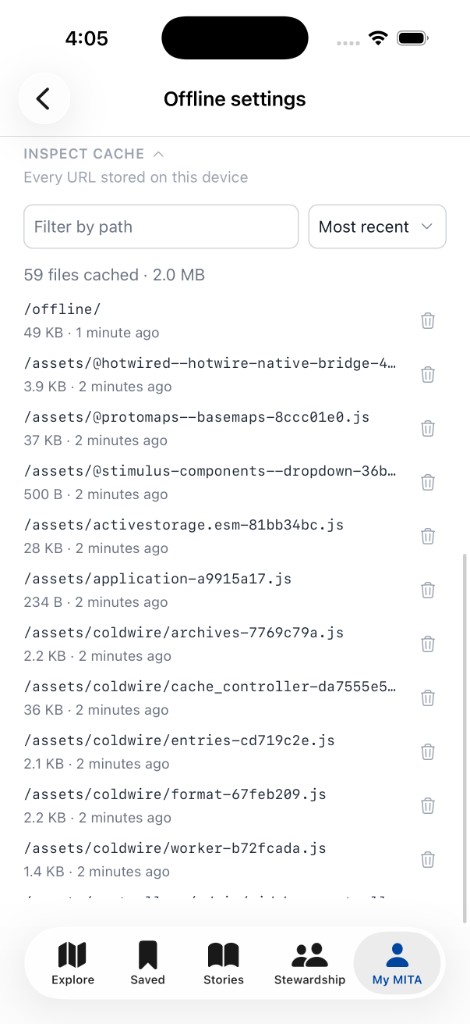
Every Coldwire install ships with a settings page at /offline: status, a force-offline toggle for testing, auto-sync controls, and a searchable list of everything currently cached.

Offline settings: every cached entry, with search, sort, and delete
Inspect the cache
The offline fallback: you're offline, this page isn't available offline, reconnect and try again
The fallback

Need help going offline?

Coldwire is built by Noreaster Group. If you want a hand adding offline support to your Hotwire or Hotwire Native app, we built the gem โ€” talk to us.

Get In Touch

Take your app offline

Whether you're rolling out Coldwire yourself or want us to do it for you, we're happy to talk through what offline support should look like for your app.